SaveFrom Video Downloader Review 2026: What We Found
A careful 2026 SaveFrom review with real website screenshots, a regional-access check, practical download safeguards, and platform-specific alternatives.
SaveFrom review 2026: the short answer
This SaveFrom review looks at what a visitor can actually verify in September 2026. SaveFrom.net is a long-running name associated with downloading video from several websites. Its reputation makes a simple question—“Does SaveFrom still work?”—surprisingly difficult to answer responsibly. Access can vary by country, the original video platform, the exact domain visited, and the day of the test.
We examined a live screenshot of en1.savefrom.net, a separate SaveFrom-branded page at www-savefrom.com/en9/, and the public instructions on that second page. Our test environment could not complete a direct SaveFrom download: connections to the domains failed before we could submit a video URL. We therefore cannot claim a successful SaveFrom download in 2026. The screenshots below are genuine website captures, not generated mockups; they document what the pages displayed, not a completed file transfer.
One especially important finding: a US-region capture of en1.savefrom.net displayed a dated notice saying the service had been discontinued in the United States. That is evidence about this regional view, not proof that SaveFrom is unavailable everywhere. Another domain using SaveFrom branding displayed a working-looking paste-and-download form, but we could not verify whether its operator is affiliated with SaveFrom.net. Treat those as two different hosts until you can establish otherwise.
Copy Video is our product. We include its Twitter Video Downloader as a narrower alternative and disclose that relationship throughout. This is a comparison of observable interfaces and stated capabilities, not an endorsement of an unverified mirror or a promise that any downloader can retrieve every video.
Which SaveFrom website did we review?
For a SaveFrom review, the domain matters more than the logo. Our first screenshot was requested from en1.savefrom.net, a subdomain of SaveFrom.net. The capture service rendered the following notice for its US-region request:
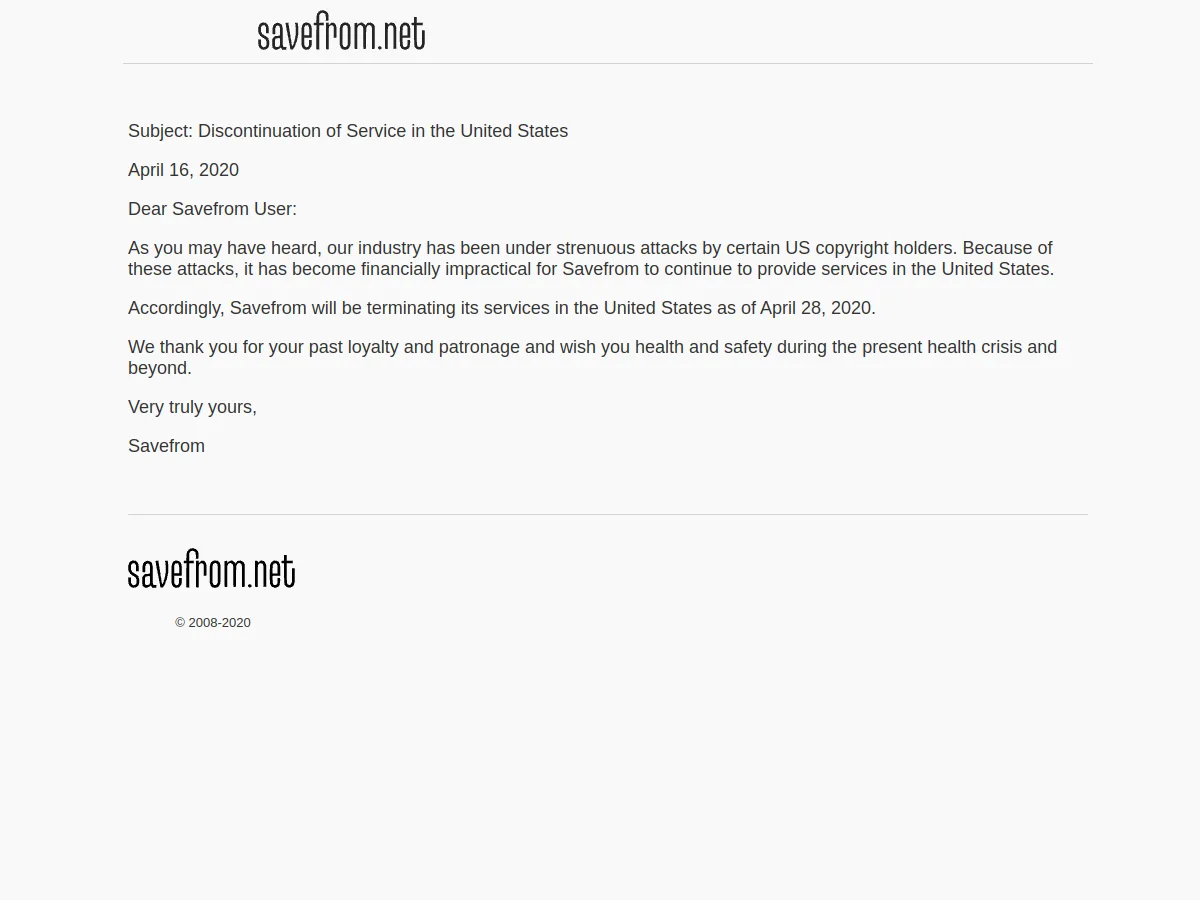
Actual en1.savefrom.net page captured on September 25, 2026 through a US-region screenshot service. The notice itself is dated April 16, 2020. It describes US availability; it is not a global shutdown announcement.
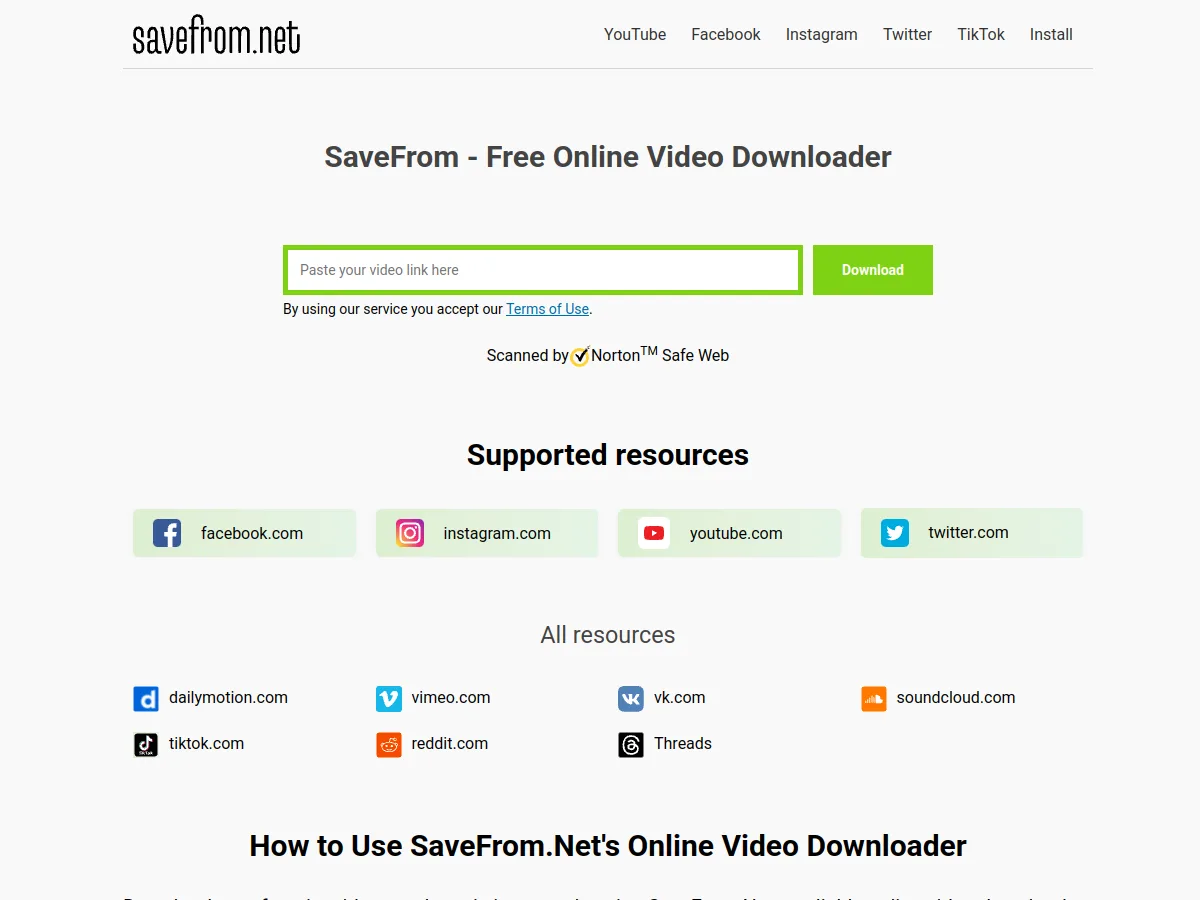
The second screenshot came from www-savefrom.com/en9/. It uses a SaveFrom.net logo and lists YouTube, Facebook, Instagram, Twitter, TikTok, and other sources. We found no independent evidence that this differently spelled domain is owned by the operator of savefrom.net. Its appearance alone cannot establish affiliation, safety, or the correctness of its download links.
Actual page at www-savefrom.com/en9/ captured on September 25, 2026. This is a different registrable domain from savefrom.net; its operator relationship was not verified. The visible form is not evidence that a submitted link will yield a valid file.
If a search result, social post, or ad sends you to a SaveFrom-branded host, read the full address before pasting a URL. A hyphen, extra word, or different top-level domain may indicate a different website. Do not infer identity from familiar colors, a logo, or a similar page title.
SaveFrom vs Copy Video: useful differences
| Decision point | SaveFrom-branded page observed | Copy Video |
|---|---|---|
| Starting point | One general URL field with several platform tabs | Separate YouTube, X/Twitter, Instagram, and TikTok pages |
| Evidence in this review | Form and US notice captured; no completed SaveFrom request | Real X/Twitter result screen captured with MP4 options |
| Output | The page advertises video and music downloads; actual files were not verified | X tool displayed available MP4 resolution links for a public post |
| Browser extension | SaveFrom-branded page promotes a helper extension | X downloader's basic web flow does not require an extension |
| Regional access | US-region en1.savefrom.net capture showed a discontinuation notice | Availability depends on each Copy Video tool and source platform |
| Private or restricted media | Not tested; do not assume access | Public-link workflow; not a way around private access |
| Best fit | You have verified the exact host and need to investigate its advertised multi-platform interface | You know the source platform and want a focused, public-link workflow |
The table is deliberately asymmetric because our evidence is asymmetric. A displayed form is not equivalent to a successful download. A public product claim is not equivalent to an inspected output file. Check the current page and its terms before relying on either service for a time-sensitive task.
How we tested SaveFrom in 2026
On September 25, 2026, we tried opening savefrom.net, en.savefrom.net, en1.savefrom.net, and the SaveFrom-branded www-savefrom.com/en9/ from the local test browser and command line. The direct connections failed with tunnel or SSL connection errors. Those errors can arise from the test network, remote protection, geography, or site configuration. They do not justify a statement that all users worldwide will see the same failure.
To inspect something real rather than rely on a search snippet, we used a remote screenshot service to capture the two pages shown above. That service reached en1.savefrom.net from a US context and returned the regional notice; it also rendered the separate branded page and its input form. We reviewed the publicly retrievable text of the branded page, including its instructions and supported-resource list. We did not install its extension, Android app, or other software; submit a link; download a file; inspect media quality; test ads; or audit data handling.
This scope is a limitation, but it is useful information. A SaveFrom review that says “it works” solely because a download button is visible would hide the most relevant uncertainty. If you need SaveFrom for a production workflow, repeat the test in your region with an authorized, public sample URL and verify the saved file itself.
What the SaveFrom-branded page promises—and what remains unverified
The observed www-savefrom.com page presents a familiar three-step idea: copy a video link, paste it into the field, and select Download. It advertises support for sources such as YouTube, Facebook, Instagram, Twitter, TikTok, Vimeo, Reddit, and others. Its related YouTube instructions describe quality options and promote helper tools.
Those are the website's statements. This SaveFrom review did not establish whether a specific platform works today, whether an advertised resolution such as 4K is available for a specific source, whether audio and video are combined in the downloaded file, or whether the service retains URLs. Original platforms can change delivery mechanisms, and a high-resolution label can only be meaningful when the source actually exposes that variant.
The extension and Android app are separate products with separate permission and trust questions. A web form cannot silently receive the same permissions as a browser extension. Before installing any helper, verify the publisher, exact store or download address, requested permissions, privacy policy, and update history. Avoid sideloading an APK merely because a website says it makes downloads easier.
A safer way to use any online video downloader
First, check your rights. A video being publicly watchable does not automatically grant permission to copy, edit, republish, or use it commercially. Keep a record of the creator, original URL, access date, and any license or permission you have.
Second, verify the input. Open the source post or watch page normally and confirm that it is the intended public item. Copy its complete URL rather than a search-results page, account profile, shortened redirect, or private link. If the downloader asks for your platform password, session cookie, or two-factor code, stop. A basic public-link downloader should not need those secrets.
Third, examine the result before clicking. Look for a file format, a plausible filename, source-matching thumbnail or title, and any resolution choices. Distinguish the actual result from surrounding ads, sponsored buttons, notification prompts, and extension-install banners. Open a downloaded file in a trusted local player and check duration, dimensions, audio, and content. A link labeled “HD” is not independent proof of HD output.
Fourth, protect the original context. A saved MP4 may lose captions, attribution, post text, licensing notes, and corrections. Store the source URL and permission record beside the file. For research or archiving, note when the video was captured; for editing, confirm the file has the audio and frame rate your project requires.
Finally, respect access controls. A private post, paywalled clip, removed upload, or region-restricted stream is not a puzzle to bypass. If you cannot view or retrieve it through authorized means, ask the creator or rights holder for the file.
When a focused Copy Video tool is more useful
If you already know the source platform, a dedicated page reduces guesswork. Copy Video has separate public-link workflows for YouTube, X/Twitter, Instagram, and TikTok. These are our tools, so this section is a product disclosure as well as a practical alternative—not independent praise.
For an X/Twitter example, our real result page showed two MP4 options after processing a public post. The screenshot identifies the submitted post and labels the available 720p and 360p links. It demonstrates that particular Copy Video X workflow at the time of capture; it does not imply that the SaveFrom sites processed the same URL, or that every X post will be supported.
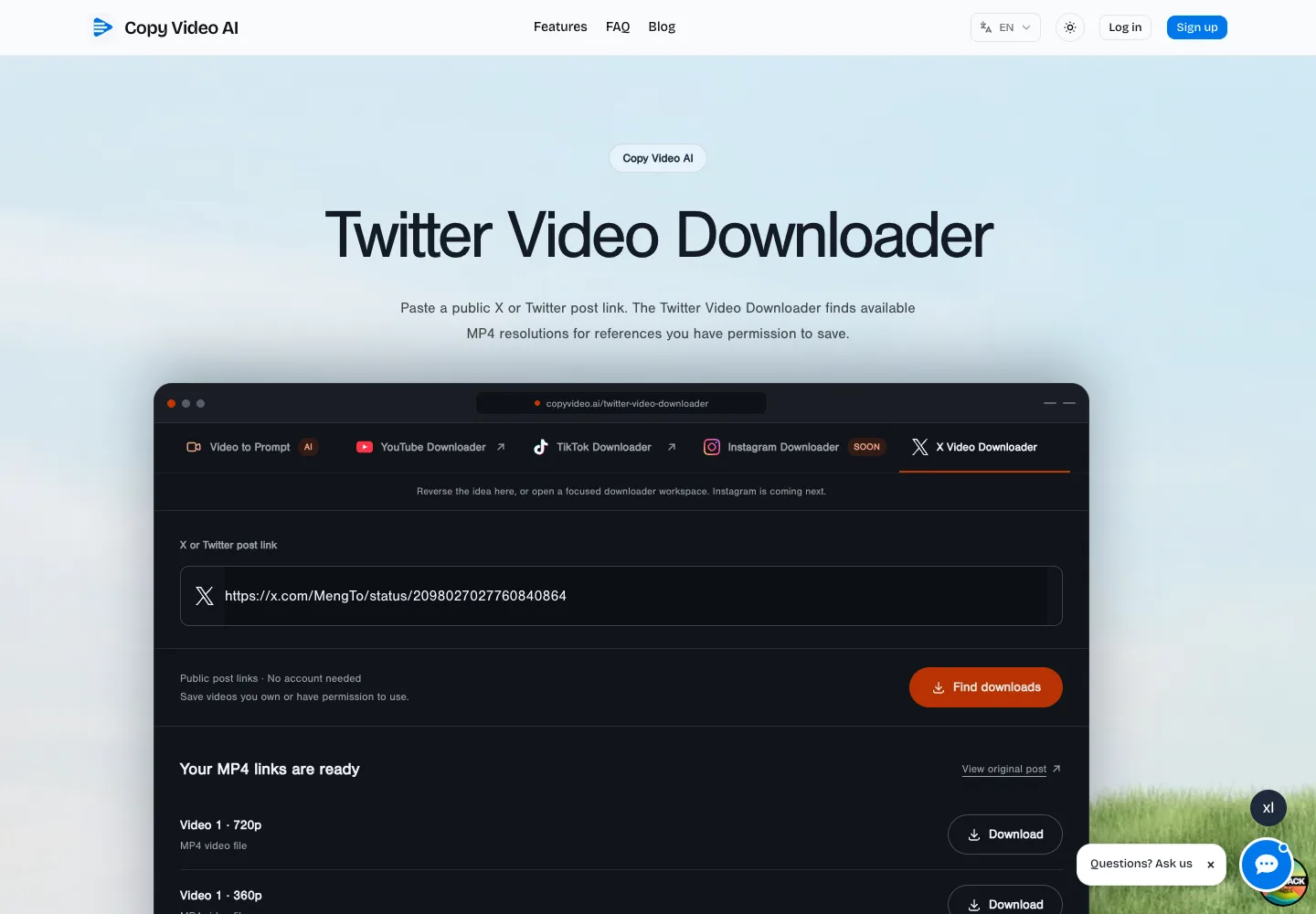
Real Copy Video Twitter Video Downloader result, captured in September 2026. Copy Video is our product. This is a separate successful X result, not a SaveFrom download.
Choose the Copy Video page matching the original website if you want an explicit platform-specific input and clear output labels. Choose another service if you need a verified capability that our focused tool does not offer. In either case, evaluate the actual output rather than the marketing promise. We did not run a successful local YouTube request for this review, so this article does not claim one.
Troubleshooting: why a SaveFrom link may not work
The site itself will not open. Check the exact domain and your region. The US-region en1.savefrom.net screenshot above shows a service-discontinuation notice. A tunnel or SSL error in our test environment does not diagnose your connection. Avoid treating a lookalike domain as the same service without verifying its operator.
The SaveFrom form opens but shows no file. Confirm that the original item is public, still online, and supported. Paste the complete watch or post URL. Try one authorized example rather than repeatedly submitting sensitive links. If the service only returns ads or installation prompts, leave rather than granting unnecessary permissions.
A file downloads but will not play. Check its actual extension, size, and media properties. A page can deliver an error document renamed as a video, or a video-only stream with separate audio. Do not assume that the highest button label guarantees a compatible MP4 with sound.
The output is lower quality than expected. The source platform may only expose lower-resolution variants, or the downloader may provide a subset. Compare with the original upload and inspect the file's dimensions and bitrate. No downloader can recreate detail that is absent from the available source.
SaveFrom review verdict
SaveFrom remains a recognizable name, and the separate SaveFrom-branded page we captured presents an easy-to-understand URL field and broad platform list. But this review cannot certify its downloads, its quality claims, its operator relationship to SaveFrom.net, or its privacy practices. The en1.savefrom.net US-region notice is a material access caveat, not a worldwide verdict.
Our practical recommendation is conditional: verify the exact domain, region, output, permissions, and your rights before using any SaveFrom-labeled service. If the job is one public X post, our Twitter Video Downloader offers a focused alternative with visible MP4 choices in the result we captured. For other platforms, start from the matching Copy Video page and test an authorized public sample. No service should be treated as a license to reuse someone else's work.
Sources, disclosure, and review method
This article was prepared on September 25, 2026. Primary pages checked: en1.savefrom.net, the differently registered www-savefrom.com/en9/, its YouTube help page, and Copy Video's Twitter Video Downloader. The two third-party screenshots were fetched by a remote website-capture service because direct local connections failed. We did not verify affiliation between the two SaveFrom-labeled domains. We did not complete a SaveFrom video download. Copy Video is the publisher and owner of the alternative discussed here; it is not affiliated with SaveFrom.
Frequently asked questions
Does SaveFrom.net still work in 2026?
We cannot answer that globally. A US-region capture of en1.savefrom.net showed a discontinuation notice, while a distinct SaveFrom-branded domain displayed a download form. Our local connections failed before a submission, so we did not verify a working SaveFrom download. Test the exact host from your region with a public, authorized URL.
Is www-savefrom.com the official SaveFrom.net website?
We could not verify the relationship. It uses SaveFrom.net branding but is a different registrable domain. Do not infer common ownership from the interface, search placement, or logo. Check the current operator and policies before entering a URL or installing software.
Can SaveFrom download private videos?
This review did not verify that capability and does not recommend bypassing privacy or access controls. Use a downloader only for content you can lawfully access and are allowed to save.
Is SaveFrom free and safe?
The SaveFrom-branded page presents a free web workflow and promotes helper software. We did not test checkout, ads, downloads, extensions, security, or data retention. “Free” does not prove privacy or safety. Verify the exact host and never enter account credentials into a download form.
What is a SaveFrom alternative for a public X video?
For a complete public x.com or twitter.com post URL, try Copy Video's Twitter Video Downloader. Our September 2026 screenshot shows that a particular public post returned labeled 720p and 360p MP4 options. Availability still depends on the post and current service behavior.