X Downloader: Twitter Video Downloader Review 2026
A hands-on X Downloader review for 2026 covering MP4, MP3, bulk and screenshot tools, public-post limits, ads, and a focused alternative.
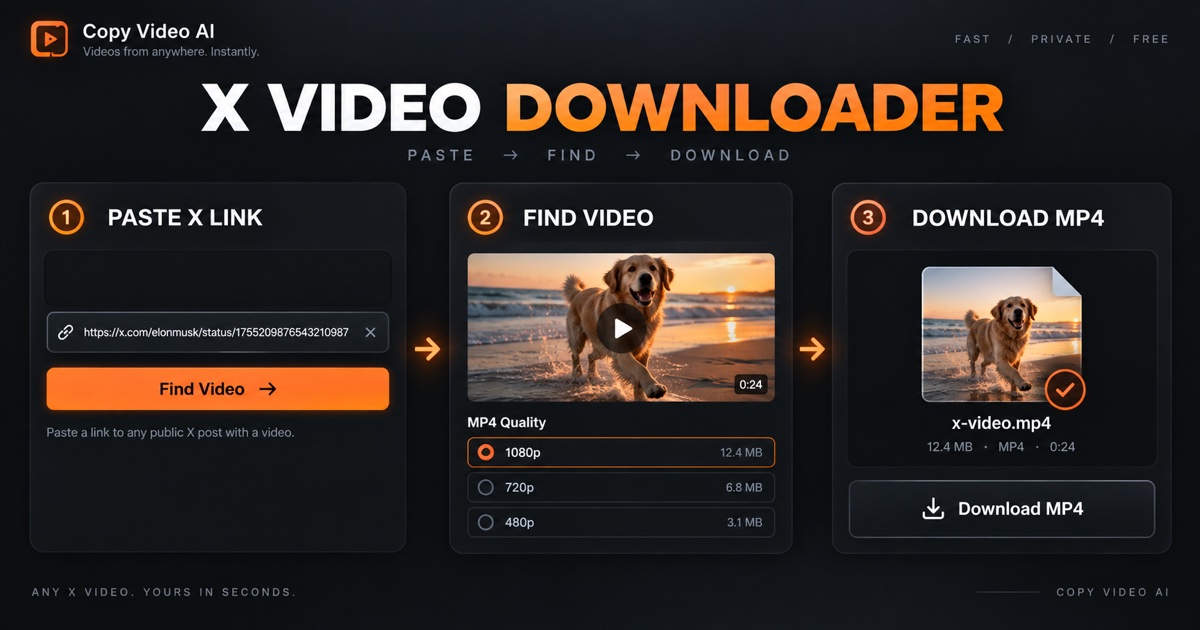
X Downloader review 2026: the short verdict
This X Downloader review examines the public X Downloader website and a real download-preparation test completed on September 17, 2026. X Downloader is a browser-based Twitter video downloader that accepts an x.com or twitter.com post link. Its site also advertises MP3 conversion, bulk downloads, post screenshots, broadcast downloads, a developer API, and a Chrome add-on.
The short verdict: X Downloader successfully prepared an MP4 result when we used the example public post supplied on its own homepage. The flow required no account and made the quality selector easy to find. Its wider toolset is useful for people who want more than one output type. However, the page is ad-supported, some prominent quality and privacy statements are the provider's claims rather than facts we independently verified, and its extension-based route for restricted videos deserves extra caution.
If you only need downloadable MP4 options from one public X post, Copy Video's Twitter Video Downloader offers a more focused workflow. Copy Video is our product, so this comparison is not presented as independent editorial endorsement. The aim is to help you choose based on input, output, and risk—not to declare one universal winner.
X Downloader vs. Copy Video at a glance
| Question | X Downloader | Copy Video Twitter Video Downloader |
|---|---|---|
| Starting point | Public X/Twitter post link | Complete public x.com or twitter.com status URL |
| Main output | MP4; separate tools advertise MP3, bulk, screenshots, and broadcasts | Available MP4 resolutions returned for one public post |
| Quality control | A “Highest Quality” selector appeared in our test | Shows available resolution labels; does not upscale or invent quality |
| Multiple videos | Separate bulk tool is advertised | Can group multiple videos returned by one supported post |
| Account needed | X Downloader says no signup is required | No X login or Copy Video account required for the downloader |
| Private or restricted posts | Website FAQ says the web tool cannot access them; it promotes an extension route | Not supported |
| Advertising | The tested page was ad-supported | Focused downloader page without third-party ad units |
| Best fit | Broad X media utility set | One known, public X video post and a clear MP4 handoff |
This is a point-in-time comparison, not a permanent specification. X and third-party services change. Recheck both live product pages before relying on a feature for an important workflow.
Hands-on test: does X Downloader work?
For this X Downloader review, we used the public example URL shown in the site's own instructions: https://x.com/xdownloadercom/status/1903302115721629989. We pasted it into the main MP4 form and selected Download Video. After processing, X Downloader displayed a filename, a Highest Quality selector, a Download MP4 link, and a Next action.
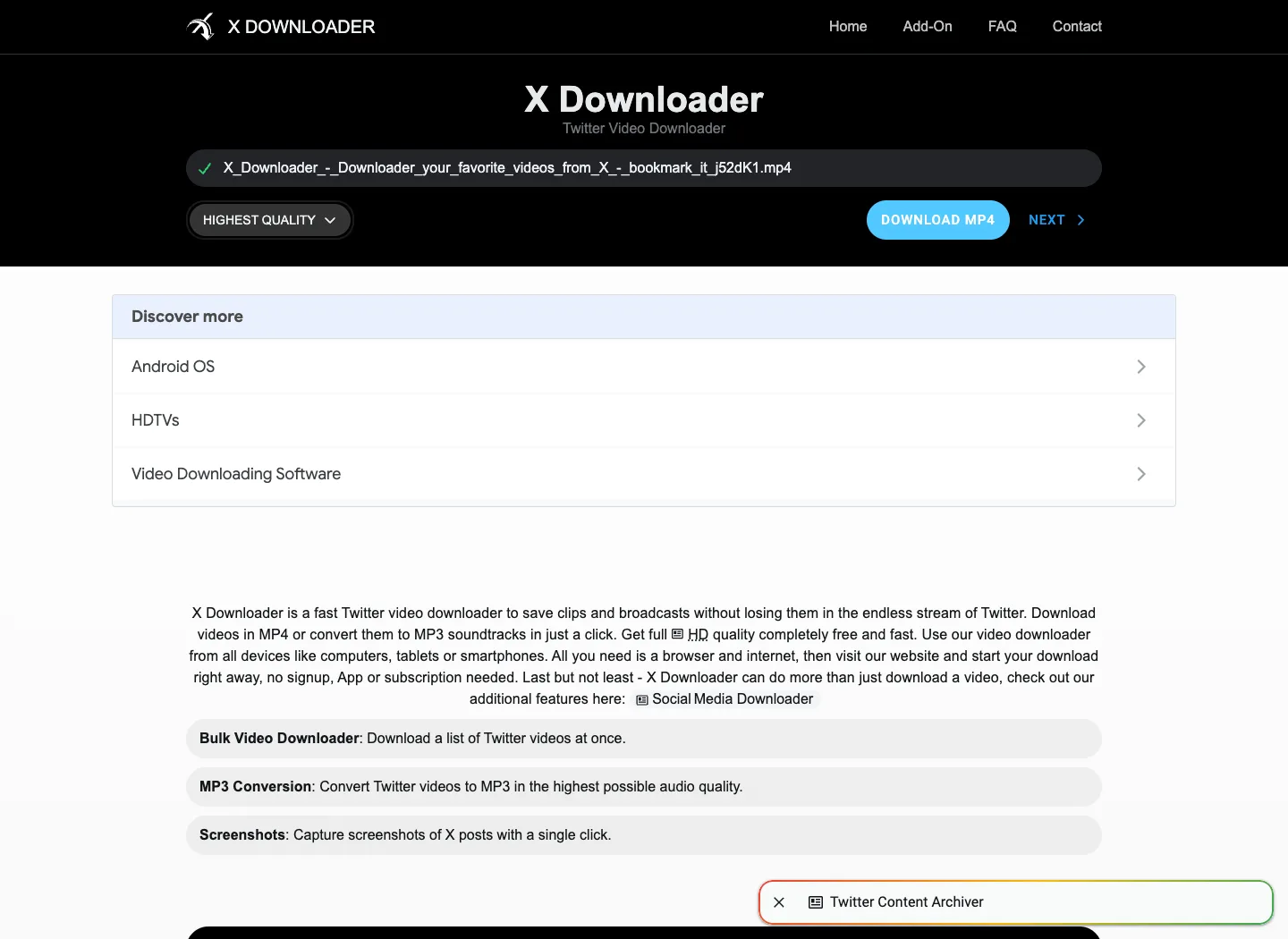
The real X Downloader result screen captured on September 17, 2026. The service prepared an MP4 link from its own public example post. We stopped before downloading the media file; this screenshot does not validate every post, quality claim, ad, or privacy statement.
That result supports a narrow conclusion: the main X Downloader MP4 preparation flow worked for the provider's example at the time of testing. It does not prove that every public post will work. Deleted posts, private or age-restricted content, live broadcasts, regional limits, X-side changes, and temporary media failures may produce a different result.
We also did not treat the filename or “Highest Quality” label as proof of source resolution. A responsible X Downloader review separates what the interface showed from what the saved file would contain. If resolution, frame rate, audio, or codec matters, inspect the downloaded file locally before putting it into an editing or archival workflow.
What X Downloader offers
The main X Downloader page starts with MP4, but the navigation exposes a broader collection of tools. At the time of review, it listed these modes:
- MP4: prepare a downloadable video file from a supported X/Twitter link.
- MP3: extract or convert the audio track through a separate mode.
- Bulk: process a list of X video links through a dedicated bulk tool.
- Screenshot: capture a rendered image of an X post.
- Broadcast downloader: a separate page for X broadcasts.
- Chrome add-on: an extension promoted for easier downloads and restricted-video handling.
- Developer API: an option for programmatic integration.
That breadth is the clearest reason to choose X Downloader. A social-media researcher may want a post screenshot, while a podcast producer may want audio and an archivist may have a list of permitted public URLs. Keeping those utilities under one brand can reduce switching between services.
Breadth also creates more decisions. MP3 conversion changes the output, screenshots preserve a presentation rather than the original video, bulk processing increases the chance of mixing sources and rights, and a browser extension receives a different level of access from a normal web form. Evaluate each X Downloader mode separately instead of assuming the risk profile of the simple MP4 page applies to every feature.
Quality, speed, and “lossless” claims
X Downloader's public copy says preparation takes about three seconds, supports original Full HD or 4K when available, streams from X's delivery network, and provides lossless MP3 extraction. It also says the service saves no information about downloads. These are X Downloader's own statements. Our hands-on check confirmed that its example reached a result screen promptly, but it did not independently audit servers, retention, media provenance, 4K availability, or audio encoding.
“Highest quality” should mean the best source variant the service can retrieve, not a magical enhancement. No Twitter video downloader can create genuine source detail that the uploaded media or X delivery variants do not contain. Likewise, converting a compressed video soundtrack to MP3 cannot restore information already removed by the source codec. If X Downloader returns several variants, download only what you are authorized to use and verify the resulting file rather than relying on a button label.
Copy Video takes a narrower position. Its Twitter Video Downloader lists MP4 resolutions returned for the requested public post and does not claim to upscale, repair, or improve them. In a successful result, the interface separates the available files so the user can choose deliberately.
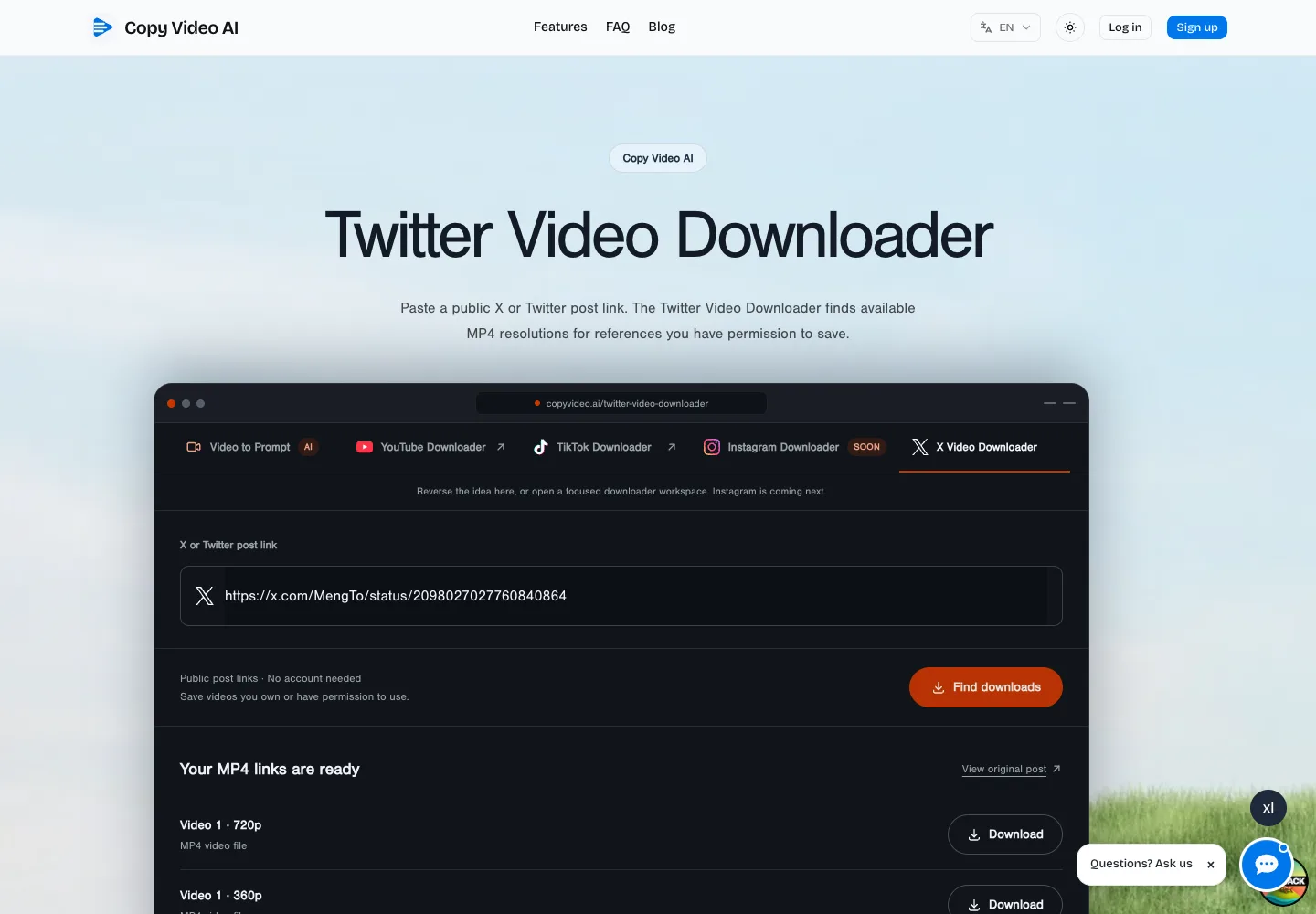
The real Copy Video result interface. It shows the exact public post URL and the MP4 resolution options returned for that request. Copy Video is our product and is not affiliated with X Downloader or X.
Ads, signup, and privacy considerations
X Downloader says it is free, requires no signup, and is funded by advertising. Our test did not encounter a registration gate. We did see clearly separate advertising or “Discover more” areas around the result and explanatory content. That does not make X Downloader unusable, but it means users should distinguish the real Download MP4 action from sponsored or unrelated links.
No signup is a useful boundary because the main web form does not ask for an X password. Still, “no account” and “anonymous” are not synonyms for “no data processing.” The URL, IP address, browser metadata, ad requests, and normal server logs may be processed according to the provider's current policies. X Downloader says it does not save download information, but this review did not audit that claim. Read the current privacy policy before submitting sensitive or embargoed URLs.
Never paste an X password, session cookie, or private token into a downloader website. The main X Downloader form did not request those credentials during our test. If an ad, clone, extension prompt, or redirect does, stop and verify the domain and publisher before continuing.
Can X Downloader download private Twitter videos?
The X Downloader FAQ draws an important distinction. It says the website cannot download restricted Twitter videos, then suggests its Chrome extension can download such media from browser storage. We did not install or test that extension, so this X Downloader review does not verify the behavior or recommend using it to bypass access controls.
An extension can request broader browser permissions than a normal web page. Before installing any X Downloader add-on, inspect its current store listing, publisher identity, permission list, update history, and privacy disclosures. Even if you can personally view a restricted post, that does not automatically authorize copying, redistribution, publication, or commercial reuse.
Copy Video deliberately supports public posts only. It accepts a complete public status URL and does not ask for X cookies or credentials. If a post is private, restricted, deleted, or unavailable to the service, treat that as a boundary rather than a technical obstacle to defeat.
X Downloader strengths
X Downloader's strongest qualities are practical:
- The core form is easy to understand and worked with the official example link.
- The result makes the MP4 action and quality selector prominent.
- No signup was required for the tested web flow.
- MP3, bulk, screenshot, broadcast, extension, and API options cover more jobs than a video-only downloader.
- The site publishes basic instructions and FAQs for desktop and mobile users.
For someone who wants a toolbox rather than a single-purpose page, those are meaningful advantages. X Downloader also makes its funding model visible by explaining that ads keep the service free.
X Downloader limitations
The same review found several limits worth planning around:
- The page includes ad and recommendation units, so the primary action is not the only clickable element.
- Claims about original quality, 4K, lossless audio, privacy, and unlimited use were not independently verified here.
- The tested success came from X Downloader's own example post, not a representative sample of unrelated accounts and media types.
- The web tool does not support restricted posts according to its own FAQ.
- Extension-based access introduces browser-permission and rights questions that the simple web test cannot answer.
- Download availability depends on X, the original post, and the third-party service continuing to work together.
Most importantly, X Downloader does not grant rights. A downloadable URL is a technical result, not a copyright license or creator approval. Keep the original post URL and a permission record with any file you save.
When Copy Video is the better alternative
Choose Copy Video's Twitter Video Downloader when you already have one exact public status URL and want a focused list of available MP4 resolutions. The page accepts both x.com and twitter.com links, requires no social login, and keeps the result centered on the downloadable files. When a supported post contains multiple videos, returned items can be grouped by video.
Copy Video does not replace X Downloader's MP3, bulk, screenshot, broadcast, or extension tools. It is intentionally narrower. That is useful when you prefer fewer choices, no third-party ad units in the download flow, and explicit public-only boundaries. It can also hand an authorized file into Copy Video's Video to Prompt workflow, but downloading a video does not automatically analyze it or create reuse rights.
A responsible Twitter video download workflow
- Open the post normally and confirm that it is public and still belongs to the expected creator.
- Confirm that you own the media or have permission for the intended download, edit, archive, or republication.
- Copy the complete
x.comortwitter.comstatus URL—not a profile URL, search page, or shortened redirect. - Use X Downloader when you need its broader output set, or use the Copy Video downloader for a focused MP4 workflow.
- Verify the saved file's resolution, duration, audio, and content before using it.
- Store the source URL, creator name, retrieval date, and permission note beside the file.
- Do not attempt to bypass private, restricted, deleted, paid, or region-blocked access.
This process matters more than the brand of downloader. It preserves context and prevents a convenient file from becoming detached from the rights and provenance that govern its use.
X Downloader review verdict
X Downloader is a capable, broad Twitter video downloader whose main MP4 flow worked in our official-example test. Its quality selector, no-signup web flow, and companion MP3, bulk, screenshot, and broadcast tools make it appealing to users who need several X media utilities. The tradeoffs are an ad-supported page, a wider set of claims than this review could independently validate, and an extension route that needs a separate permission and privacy assessment.
For broad utility, X Downloader is worth considering for public media you are authorized to save. For one known public post and a simpler MP4-only handoff, Copy Video's Twitter Video Downloader is the focused alternative. Neither service should be used to defeat privacy controls or imply that public access equals permission to reuse.
Sources and review method
This X Downloader review checked the public X Downloader homepage, FAQ copy, navigation, and live result interface on September 17, 2026. We submitted only the provider's published example status URL and did not click the final media download, test the Chrome extension, run a bulk job, convert audio, inspect server logs, or validate every advertising destination. X Downloader and X are third-party trademarks; Copy Video is not affiliated with either company. Product behavior and policies can change after publication.
Frequently asked questions
Is X Downloader free?
X Downloader says its web tools are free and supported by ads. The tested MP4 flow did not ask us to create an account or pay. Recheck the live page because features, limits, advertising, and pricing can change.
Does X Downloader work in 2026?
Yes for the narrow test described here: on September 17, 2026, X Downloader prepared an MP4 result from the public example link on its own homepage. That does not guarantee every public video, broadcast, or future request will succeed.
Can X Downloader save private X or Twitter videos?
Its FAQ says the website cannot download restricted videos and promotes a Chrome extension for browser-based handling. We did not verify that extension. Do not use any tool to bypass privacy controls, and review extension permissions before installation.
Does X Downloader provide 4K or lossless quality?
X Downloader advertises original Full HD or 4K when the source provides it and describes MP3 extraction as lossless. This review did not independently validate those claims. Check the downloaded file's actual resolution, codec, bitrate, and audio before relying on it.
What is the best X Downloader alternative for one public post?
If you have a complete public x.com or twitter.com status URL and need the available MP4 resolutions, use Copy Video's Twitter Video Downloader. It does not provide X Downloader's broader MP3, bulk, screenshot, or private-extension workflows.